

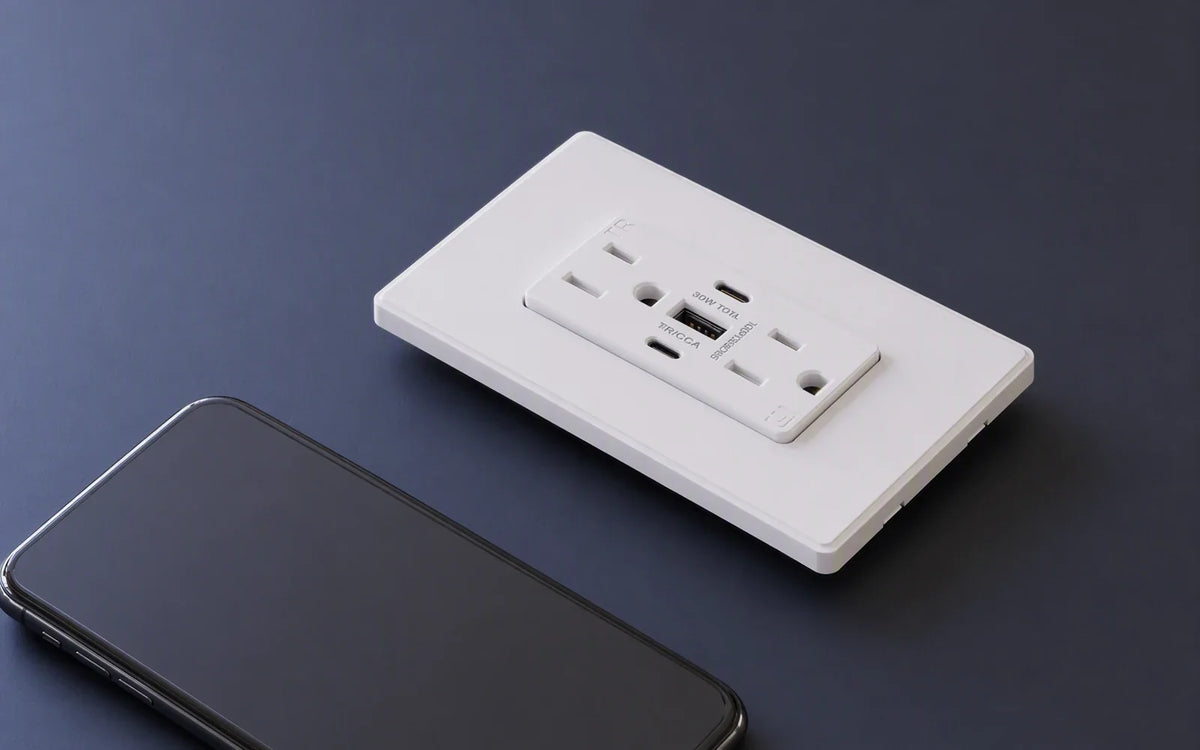
Where Your Money Goes in a Wall Outlet: Safety, USB, and Power Features

Quick answer
The faceplate is the cheapest part. Across four models Wirecutter tested in 2026, prices ran from about $30 to $80, and a fifth model on a manufacturer's own page lists at $122.37. [1][3] What moves the number is charging hardware, safety certification, how many AC outlets you keep, whether a wall plate is in the box, and how long the warranty runs.
The clearest single example: two outlets from the same brand that look nearly identical cost $50 and $80, and the $30 gap buys a jump from 30 watts to 60 watts from one port, plus the wall plate. [1][2]
Four things that decide the price, before you look at any spec sheet:
- Cheap can mean fewer AC outlets, not worse charging. The least expensive model tested still delivers 30 watts, but it has only one AC receptacle instead of two. [1] That is a functional trade, not a quality one.
- More expensive does not always mean longer warranty. A $40 model carries a lifetime warranty; a $50 model from another brand carries two years. [1]
- A certification mark is not a ranking. UL and ETL are both issued by labs on OSHA's recognized list, so an ETL mark is not a lesser grade. [4]
- Returns flatten at the top. Going from 60 watts to 65 watts costs roughly $42 more and puts the wall plate back on your shopping list. [1][3]
The price ladder, from about $30 to $122
Most articles about outlet pricing describe cost buckets without ever naming a number. That makes the category harder to shop, not easier. So here is a real ladder first, and the explanation second.
Wirecutter tested four USB-equipped outlets for its 2026 guide and published a price for each, along with what its own bench testing found about charging behavior. [1] A fifth model, a higher-wattage unit, lists its price publicly on the manufacturer's site. [3] Together they cover the full spread a shopper actually faces.
| Price | Model | Charging, as tested or published | The trade you are making |
|---|---|---|---|
| ~$30 [1] | Anker PowerExtend A9312 | 30W combined: one 30W USB-C plus two 5W USB-A | Only one AC outlet instead of two; ETL listed; 18-month warranty; wall plate included |
| ~$40 [1] | Legrand Radiant R26USBPD | 30W: up to 30W per port, or 30W total | No wall plate in the box; UL listed; lifetime warranty |
| ~$50 [1] | Leviton T5635 | 30W individually, or 30W total with both ports in use | No wall plate in the box; UL listed; two-year warranty |
| $80 [1] | Leviton T5636 | Up to 60W from a single USB-C port; splits 60W when both are used | Wall plate included; white only; 15A tamper-resistant [2] |
| $122.37 [3] | Legrand Radiant 65W | 65W dual Type-C Power Delivery | Wall plate sold separately and restricted to one collection; 15A tamper-resistant; charging indicator light |
Prices are as published at the time each source was written and will move. Treat the gaps between rungs as the durable information, not the absolute figures.
$30 to $40: you are buying back an AC outlet. The cheapest model still charges at 30 watts, so the saving does not come from weak charging electronics. It comes from giving up one of the two AC receptacles. [1] If the whole point of a USB outlet is to stop losing wall sockets to charging bricks, that is a meaningful thing to give up. This rung also swaps an 18-month warranty for a lifetime one and loses the included wall plate.
$40 to $50: sometimes you pay more and get less on paper. Both models are 30 watts, both UL listed, both ship without a wall plate. The cheaper one carries a lifetime warranty; the pricier one carries two years. [1] Color availability, brand, and distribution price into an outlet just like hardware does. This is the rung that should make anyone skeptical of reading price as a quality score.
$50 to $80: this is the cleanest illustration in the whole category. Same brand, same two AC outlets, same UL listing, same two-year warranty, and the two units look nearly identical from the front. The $30 difference buys two things: charging that delivers up to 60 watts from a single port instead of 30, and a wall plate in the box. [1][2] If you ever want a concrete answer to "where does my money go," it is here.
$80 to $122: returns flatten. The step up adds five watts, adds a charging indicator, and keeps tamper-resistant shutters. But the wall plate moves back to a separate purchase, and it must come from one specific collection. [3] Roughly $42 more for five watts and a light is a very different value proposition than the previous rung, and it is worth naming plainly.
First, sort the category
Value talk goes wrong when different products get compared as if they were the same thing. Five categories sit behind the same rectangular opening in your wall.
A standard receptacle is the familiar duplex outlet with no built-in charging. A tamper-resistant receptacle adds internal shutters designed to block foreign objects unless equal pressure is applied to both slots. A USB outlet adds charging ports, usually USB-A, USB-C, or both. A USB-C Power Delivery outlet steps charging power up for newer laptops and tablets. A GFCI outlet is a separate safety category built to cut power quickly in higher-risk locations, and it is required by code in specific places rather than chosen for convenience. [6]
Those last two are the ones people conflate most often. Power Delivery is a charging feature you buy because you want it. GFCI protection is a code requirement you satisfy because the location calls for it. Deciding between them is not a decision at all; you check the location first, then choose charging.
One category, several names. This part is newer than the receptacle it replaces, so its naming never settled. The same device is sold as a USB outlet, a USB wall outlet, or an outlet with USB, and models with the newer port type appear as a USB C outlet or an outlet with USB C. Two of those habits are worth pausing on, because they change what you think you are buying:
- "USB A/C outlet" describes a layout, not a bonus. It means USB ports sitting alongside the AC receptacles in one device. That matters more than it looks, because the number of AC receptacles you keep is not constant across models — as the ladder above shows, the least expensive option keeps only one. [1]
- "Tamper proof" is a shopping word, not a technical one. The term used in the code and on spec sheets is tamper-resistant, usually abbreviated TR. The distinction is not pedantry: the mechanism raises the difficulty of getting a foreign object into an energized slot, and nothing about it is proof against a determined effort.
The four cost buckets behind a modern outlet
A modern outlet earns its price in four places. Looking at them separately is what makes the ladder above stop feeling arbitrary.
Safety hardware. Tamper-resistant shutters, the internal contact design, and the evaluation work behind a listing mark. This bucket is invisible once the plate is on the wall, which is exactly why it gets undervalued.
Charging electronics. A plain receptacle passes household AC through safely. A USB outlet has to convert that AC into stable low-voltage DC. Once USB-C Power Delivery is involved, the circuitry has to negotiate charging profiles, manage heat, and decide how to split power between ports. The $50-to-$80 rung is this bucket, almost by itself.
Installation and finish. Back and side wiring options, 15-amp versus 20-amp format, and whether a wall plate is included. That last item sounds trivial until you notice it moves between rungs three separate times in the table above.
Warranty and support. Easy to overlook because it is not a feature you can see or feel. The tested models ranged from 18 months to a lifetime, [1] and as the $40-to-$50 rung shows, warranty length does not track price.
The reason two outlets can look nearly identical from the front and still be very different products is that three of these four buckets are entirely internal or entirely on paper.

Safety comes before USB: what you pay for first
Before charging speed enters the conversation, the first job of any outlet is safe power delivery. That sounds obvious, but it is the reason a decent receptacle is more than molded plastic and metal contacts.
Tamper-resistant shutters are the baseline worth paying for in family homes. The shutters sit behind the slots and open only when both prongs engage together. Normal plugs still go in; stray objects are much less likely to reach energized parts. If you are upgrading bedrooms, hallways, play areas, or living spaces, this is often the feature carrying the value even though nobody discusses it after installation. Note that both of the higher-wattage models in the ladder above are tamper-resistant, so on those rungs you are not choosing between safety and charging. [2][3]
Receptacle format has to match the circuit, not your preference. A 15-amp outlet is the standard choice in most rooms, and a listing showing NEMA 5-15R is that common format. A 20-amp receptacle is a different format, typically identified by the T-shaped neutral slot and listed as NEMA 5-20R, and it belongs where the circuit and the intended load call for it. A 20-amp receptacle is not an upgrade you install everywhere; putting one on a circuit that does not support it creates a mismatch rather than a benefit.
GFCI protection is a location requirement, not a feature tier. A GFCI outlet interrupts power quickly when it detects a ground fault, which is why it is used in kitchens, bathrooms, garages, and outdoor-adjacent areas. The requirement itself comes from the National Electrical Code, Article 210.8, which covers ground-fault circuit-interrupter protection for personnel; the specific locations listed have expanded across editions, so the edition in force where you live is what governs. [6] A GFCI outlet costs more than a standard receptacle because it contains active shock-protection circuitry, not because it wears a different faceplate.
GFCI outlet cost also stacks with everything else on the same device. The category now includes a tamper resistant GFCI outlet and a GFCI outlet with USB, so one part can be carrying ground-fault protection, shutters, and charging electronics at once. Each of those is a separate line in the price, which is why comparing two GFCI receptacles on price alone rarely tells you anything.
Searches for “cost to install GFCI outlet” and “cost to replace GFCI outlet” are really asking about labor, not hardware. GFCI outlet installation cost depends on your region, on whether the box needs work, and on what the electrician finds when the old device comes out — so those figures belong in a local quote rather than a national article. Replacing a receptacle is work on a circuit that must be properly de-energized first, and where local rules or your own comfort level call for it, use a licensed electrician.
Certification marks: UL, ETL, cUL, and where FCC fits
This is the part of outlet pricing most often misread, and getting it wrong can push you toward paying more for no added safety.
In the United States, product safety evaluation for this kind of device is done by labs that OSHA recognizes as Nationally Recognized Testing Laboratories. OSHA's current published list includes UL LLC, Intertek Testing Services NA — the lab behind the ETL Mark — and CSA Group Testing and Certification, among others. [4] All three appear on the same list.
The practical consequence is direct: an ETL-listed outlet is not carrying a lesser certification than a UL-listed one. In the tested group, the least expensive model was ETL listed and the three pricier ones were UL listed, [1] which is a useful reminder that mark recognition and price are not the same axis. What matters is that a recognized lab evaluated the product to the applicable standard, and that the mark is real rather than a lookalike graphic.
Two related points, so this does not get over-read:
- cUL indicates evaluation for Canada. If you are buying in the United States only, its absence is not a gap. If a product will be installed in Canada, it matters.
- FCC compliance is about interference, not electrical safety. Once an outlet contains charging electronics, it becomes an electronic device capable of emitting radio-frequency energy, which brings it under the FCC's Part 15 rules for unintentional radiators. [5] That is why FCC markings show up on USB-equipped outlets and generally not on plain duplex receptacles. It tells you nothing about shock protection or charging quality.
So on the certification line of a listing, the useful question is not "is it UL" but "was it evaluated by a recognized lab, and is FCC compliance stated if it charges."
USB changes the math: why charging power raises cost
Once USB charging is built in, the economics change fast, and the tiers are fairly well defined.
The 18W to 21W tier sits below the group Wirecutter tested, [1] so there are no bench figures for it here. By its rating it covers phones, earbuds, and slower tablet charging; it solves clutter well and is not aimed at laptop duty.
The 30W tier is where built-in charging starts to feel genuinely versatile. Wirecutter's testing found that 30 watts is enough to power a small laptop or charge two phones at the same time while leaving two AC outlets free. [1] Three of the five models in the ladder sit at this tier, spanning about $30 to about $50 — which tells you that at a given wattage, price is being set by everything except the wattage.
The 45W to 65W USB-C Power Delivery tier is the one people mean when they ask whether a wall outlet can really charge a laptop. Wirecutter reported that in its testing, a 60-watt dual-USB-C outlet delivered up to 60 watts from a single USB-C port, which it described as enough power to charge most laptops or tablets at a decent pace. [1] At the top of the range, one manufacturer states that its 65W dual Type-C model is intended for small laptops including 13-inch class notebooks, Chromebooks, and Surface-class tablets, and describes multi-layered overcurrent protection in the unit. [3]
The reason this tier costs more is physical: stronger power-conversion components and more thermal headroom inside the same box. That is also why the jump from 30W to 60W in the same product family carried a $30 premium while the jump from 60W to 65W carried about $42 for far less added capability. [1][3]
Combined output versus single-port output
This is the single most misleading line on a USB outlet listing, and it deserves its own section because the numbers involved look identical on a box.
Two outlets can both advertise 30 watts and behave differently. Wirecutter's testing of the two 30W models found they deliver up to 30 watts from one port, or 30 watts total when both ports are in use. [1] In other words, plugging in a second device does not add power; it divides what is there.
The 60W model behaves the same way one level up: up to 60 watts from a single USB-C port, and 60 watts split between the two ports when both are occupied. [1] Wirecutter noted that a split 60 watts is still enough to fast-charge a pair of smaller devices such as a phone and earbuds. [1]
| What the listing says | What it usually means | When it matters |
|---|---|---|
| "30W total" or "30W combined" | The ports share 30 watts. Two devices at once each get a fraction | Any time you charge two things simultaneously |
| "Up to 60W from a single port" | One port can reach 60W when it is the only one in use | Laptop charging on an otherwise empty outlet |
| "65W Power Delivery, dual Type-C" | Read further; the headline may be per-port capability, combined capability, or both | Before assuming a laptop and a phone can share it at full speed |
The practical rule: if you plan to charge a laptop and a phone at the same time from the same outlet, the power-sharing behavior matters more than the headline number. A 60W outlet splitting to 30W and 30W is not a 60W laptop charger while your phone is plugged in.
Matching features to rooms
Match features to the room instead of buying the highest-spec model everywhere. That single habit does more to control cost than any individual purchase decision, because the same $80 outlet is money well spent at a desk and money wasted in a hallway.
| Room or use case | Outlet type to look at | Safety requirement that comes first | Where the money is well spent, or wasted |
|---|---|---|---|
| Bedside phone charging | Tamper-resistant USB outlet | Tamper-resistant shutters | 30W is plenty. Laptop-class power here is headroom you will not use |
| Kitchen counter or sink-adjacent | GFCI receptacle; charging only if appropriate for the location | GFCI protection per the code edition in force [6] | Protection first. Convenience features come after it, not alongside it |
| Home office laptop charging | USB-C Power Delivery outlet | Correct 15A or 20A match to the circuit | One of the few rooms where paying up for charging power pays back daily |
| Living room, mixed devices | Mid-tier USB-C outlet | Tamper-resistant shutters | Mid-tier clears the cable sprawl. Workstation-class power is over-buying |
| Guest room | Tamper-resistant USB-C outlet | Tamper-resistant shutters | 30W covers a phone and a tablet without high-power pricing |
| Hallway, entry, family room | Standard tamper-resistant receptacle | Tamper-resistant shutters | Often the smartest spend in the house: no USB, no premium, shutters where hands are |
The asymmetry is worth noticing. Under-buying costs you a charging brick you have to keep on the nightstand anyway. Over-buying costs you real money in every room where nobody ever plugs in a laptop — and there are usually more of those rooms than the other kind.

What each wattage tier costs in practice
Read this table against the ladder: the middle column is what you get, the right column is what the market actually charged for it.
| Wattage tier | What it comfortably handles | Where it sat in the tested group |
|---|---|---|
| 18W–21W | Phones, earbuds, slower tablet charging | Below the tested range |
| 30W | A small laptop, or two phones at once, with two AC outlets still free [1] | About $30 to about $50 [1] |
| 60W single-port | Most laptops or tablets at a decent pace [1] | $80 [1] |
| 65W dual Type-C | Small laptops including 13-inch class, Chromebooks, Surface-class tablets, per the manufacturer [3] | $122.37, wall plate separate [3] |
If a room only needs overnight phone charging, paying for laptop-class power is money spent on headroom you will not use. If it is a work zone, that headroom is exactly where the money should go.
A ladder built from five products also has a gap worth naming: it says what these particular models cost, not what the tier costs. The same wattage is available at more than one price point, and the only way to know where a given brand sits is to line its own range up against the rungs.
Where ELEGRP sits on this ladder. ELEGRP makes wiring devices for U.S. homes and sells them directly at store.elegrp.com, and its published prices land on the low side of every rung above. A standard self-test tamper-resistant GFCI receptacle starts at $12.99. [7] A 30W USB-A/USB-C outlet is $29.99, [8] the same price as a GFCI outlet with dual USB-C ports that puts ground-fault protection and 24W of charging in one gang. [9] The 45W dual Type-C model is $41.99, [10] and the 65W dual Type-C model is $64.99. [11]
Two of those numbers speak directly to rungs in the table. The 65W tier appears above at $122.37 with the wall plate sold separately and locked to one collection; [3] ELEGRP's 65W lists at $64.99 with a screwless wall plate in the box. [11] And the third cost bucket — installation and finish — is where that shows up again: the USB models list a screwless plate as included and offer back and side wiring plus 15A and 20A versions, so the plate is not a second purchase and the format is not a special order. [8][11] None of that makes any single model the right one for your wall. It does mean the rung you land on is worth checking against more than one brand's range before you accept it as the going rate.
The small details that change daily use
The features people remember after installation are rarely the headline wattage numbers.
Whether a wall plate is in the box. This appears trivial and it is not. In the ladder above it moves three times: included at $30, absent at $40 and $50, included at $80, and sold separately again at $122 — where it is also restricted to one manufacturer's collection. [1][3] A plate is a few dollars on its own, but a plate that must come from a specific line is a constraint, not just a cost. Read that line before assuming the price you see is the price you pay.
Port layout. USB ports placed above the AC sockets let cables hang more naturally and leave the plug area less crowded. That sounds minor until you are trying to plug in a lamp, a vacuum, and a charging cable in the same spot.
Wiring flexibility. Back and side wiring options can make installation easier depending on box depth and installer preference. Not glamorous, but it can be the difference between a straightforward swap and a frustrating one.
Charging indicators. The highest-wattage model in the ladder includes an indicator that shows charging status. [3] Useful or distracting depending on the room — in a bedroom, a status light on the wall is not universally welcome.
How to read a USB outlet listing without overpaying
Read the listing in this order. The order matters more than the individual checks, because getting it wrong means paying for features that a location requirement will override anyway.
- Start with the location. If it falls under GFCI requirements, that comes first and narrows everything after it. [6]
- Confirm the circuit format. NEMA 5-15R is the common 15-amp receptacle; NEMA 5-20R is the 20-amp style. Match the circuit, do not upgrade for its own sake.
- Check the wattage tier. 18W–21W for phones and small devices, 30W for the practical middle, 60W-plus if laptop charging is genuinely part of the plan.
- Read the port behavior, not just the number. "Total" and "per-port" are different claims. [1] This is the step most shoppers skip.
- Count the AC outlets you keep. At least one model on the market trades an AC receptacle for its lower price. [1] Confirm you are getting two if you want two.
- Look for the wall plate and wiring options. A plate in the box saves a small purchase; a plate locked to one collection is a longer-term constraint. [3]
- Confirm tamper resistance if the outlet is going anywhere children reach.
- Check the certification and warranty last. Any recognized lab mark — UL, ETL, CSA — indicates evaluation by a lab on OSHA's list. [4] FCC compliance should be stated because charging electronics are present. [5] Warranty terms in the tested group ranged from 18 months to lifetime and did not track price. [1]
Frequently asked questions
Is a USB wall outlet worth it in a bedroom?
Usually, yes. Bedrooms are one of the clearest cases because the goal is convenience rather than heavy electrical load. If the outlet is mainly charging phones, earbuds, watches, and maybe a tablet, built-in USB reduces charging bricks and frees the AC sockets for lamps or a white-noise machine. A 30W model is often the sweet spot if occasional small-laptop charging is part of the routine, and 30W models were available from about $30 to about $50 in the tested group. [1]
Is 30W enough for a laptop?
For some laptops, yes. Wirecutter's testing found 30 watts is enough to power a small laptop or charge two phones at the same time while leaving two AC outlets free. [1] That makes 30W a realistic target for lighter notebooks, tablets with keyboards, and travel-friendly setups. It is not a safe assumption for larger or more power-hungry machines, and manufacturers publish per-model charging requirements — a 60W outlet is not a promise about your particular machine.
When does a 60W-plus outlet make sense?
When the outlet is replacing a real charger rather than adding convenience. Wirecutter reported that in its testing a 60-watt outlet delivered up to 60 watts from a single USB-C port, enough to charge most laptops or tablets at a decent pace. [1] For a home office, study nook, or bedside spot where a laptop regularly gets plugged in, this is the tier that justifies its cost. Above it, returns flatten quickly — 65 watts cost roughly $42 more than 60 in the models compared here. [1][3]
Why does a GFCI outlet cost more than a standard receptacle?
Because it does more. A GFCI outlet contains active shock-protection circuitry designed to interrupt power quickly when it detects a ground fault, which is why the code requires it in kitchens, bathrooms, garages, and outdoor-adjacent areas. [6] You are paying for protection hardware, not a different outlet shape. For reference, a self-test tamper-resistant GFCI receptacle can start around $12.99. [7]
Is an ETL-listed outlet less safe than a UL-listed one?
No. Both UL LLC and Intertek Testing Services NA, the lab behind the ETL Mark, appear on OSHA's current list of Nationally Recognized Testing Laboratories, as does CSA Group. [4] A recognized lab mark means the product was evaluated to the applicable standard. In the group compared here, the least expensive model was ETL listed and the pricier ones were UL listed, [1] so the mark is not a price or quality tier.
What is a tamper-resistant outlet, and is "tamper proof" the same thing?
They refer to the same hardware. A tamper-resistant outlet has spring-loaded shutters behind the slots that stay closed unless both blades of a plug push in together, which is why a normal plug works and a single inserted object generally does not reach an energized contact. Retail listings often write it as tamper proof; the term used in the code and on spec sheets is tamper-resistant, abbreviated TR. Resistant is the accurate word — the mechanism raises difficulty, it does not make a receptacle proof against a determined effort, and it is not a substitute for supervision.
What is the difference between a GFCI outlet and an AFCI outlet?
They protect against different failures, and both cost more than a plain receptacle. A GFCI receptacle watches for ground faults — current leaking to an unintended path, including through a person — and cuts power fast. An AFCI watches for arcing faults, the intermittent sparking in damaged or loose wiring that can ignite surrounding material. So the question is shock protection versus fire protection, not which is better. Some parts are dual-function and carry both listings. Which protection a given location requires depends on the code edition adopted where you live, [6] so confirm the requirement with whoever is working from the edition in force rather than choosing on price.
Do tamper-resistant outlets feel tighter by design?
Sometimes, yes. The shutters add resistance because both plug blades need to engage the mechanism together. A well-made outlet should feel normal after a little use, but it can feel firmer than an older non-tamper-resistant receptacle at first. This is expected behavior from the mechanism rather than a defect.
Does a more expensive outlet come with a longer warranty?
Not reliably. In the tested group, a roughly $40 model carried a lifetime warranty while a roughly $50 model from a different brand carried two years, and the $80 model also carried two years. [1] Warranty length is worth checking as its own line item rather than assumed from price.
What is the cheapest way to get USB-C charging without giving anything up?
Decide what "giving anything up" means for you first. The lowest-priced model in the tested group reaches 30 watts but has only one AC receptacle instead of two. [1] If keeping both AC outlets matters, the entry point in that group rises to roughly $40, where you get 30 watts, two AC outlets, and a lifetime warranty, but you buy the wall plate separately. [1] Other brands price the same tier differently — a 30W USB-A/USB-C model with a screwless plate included lists at $29.99. [8]
The bottom line
The faceplate is the cheapest part of a wall outlet. What you actually pay for is charging hardware, safety evaluation, how many AC receptacles you keep, what comes in the box, and how long the manufacturer stands behind it.
Read the ladder rather than the label. Three models at the same 30 watts spanned about $30 to about $50, and the differences were an AC outlet, a wall plate, and a warranty — not charging capability. [1] One rung up, $30 bought a genuine capability jump from 30 watts to 60 from a single port. [1][2] One rung above that, roughly $42 bought five watts and a status light, and moved the wall plate back onto your list. [3]
So the decision order that keeps cost sane is the reverse of how most listings are written: location requirement first, circuit format second, wattage tier third, port-sharing behavior fourth, and certification and warranty as the final confirmation. Do it in that order and outlet pricing stops feeling arbitrary — it turns into a legible trade between protection, power, and convenience.
References
- The 4 Best Wall Outlets With USB Charging Ports of 2026 — Reviews by Wirecutter
- Leviton T5636-W — 60W (6A) USB Dual Type-C/C Power Delivery Wall Outlet Charger with 15A Tamper-Resistant Outlet
- Legrand radiant 65W USB Outlet, Type C, 15A, Tamper-Resistant
- OSHA — Current List of Nationally Recognized Testing Laboratories
- FCC Part 15, Radio Frequency Devices
- NFPA 70, National Electrical Code, Article 210.8 — Ground-Fault Circuit-Interrupter Protection for Personnel
- ELEGRP GFCI Outlet, 15A/20A, Self-Test, Tamper-Resistant — official product listing: from $12.99, twin solenoids with dual SCRs, self-test every 5 seconds, TR shutters, slim body for shallow boxes, screwless wall plate included, UL and cUL listed
- ELEGRP 30W USB-A/USB-C Wall Outlet — official product listing: $29.99, Type C 5V/3A through 20V/1.5A, Type A up to 27W alone, 15A/20A, tamper-resistant, back and side wiring, screwless wall plate included, UL and cUL listed
- ELEGRP GFCI Outlet with USB Type C/C Ports, 15A/20A 125V 24W, Tamper-Resistant — official product listing: $29.99, dual USB-C sharing 24W, GFCI-protected AC outlet, self-test every 5 seconds, fits standard electrical boxes, UL listed
- ELEGRP 45W Dual USB-C Wall Outlet — official product listing: $41.99, USB C/C 45W total output, 15A/20A, tamper-resistant, screwless plate
- ELEGRP 65W Dual USB-C Wall Outlet — official product listing: $64.99, 5V/3A through 20V/3.25A (65W max), dual Type-C ports above the AC outlets, 15A/20A, tamper-resistant, back and side wiring, screwless wall plate included, UL and cUL listed


