

USB-A vs. USB-C Wall Outlets: How to Choose the Right Port Mix

Quick answer
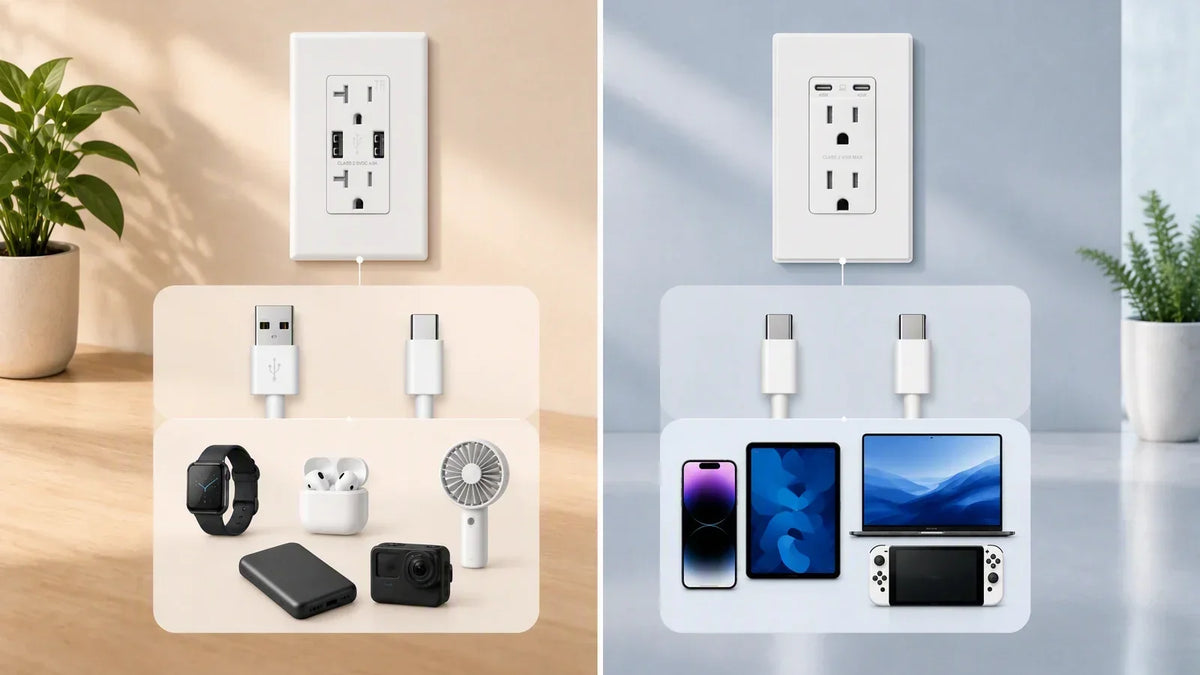
Choose a USB wall outlet by checking the connector at the outlet end of every cable your household or property still uses each week. A mixed USB-A/USB-C model is the practical bridge when older charging leads remain in regular use. Dual USB-C makes more sense when the cable inventory is already USB-C and replacements will also be USB-C.
Then check the charging specification for each port, especially the output with both ports occupied. USB-C describes a reversible connector; it does not guarantee USB Power Delivery or a particular wattage. USB-A can also deliver useful charging power when the outlet and device support compatible charging modes. The published voltage-and-current profiles settle that question.[1][2]
The key points:
- Count cable ends, not device ages. A current phone may still use a USB-A-to-USB-C cable, so the connector facing the wall is the one that determines the outlet port you need.
- Mixed A/C is a transition choice. Keep USB-A where wearables, e-readers, guest cables, or proprietary charging pucks still use it every week.
- Dual USB-C is the cleaner long-term choice. It removes an older port only when the people using the room have already moved to USB-C cables.
- Connector type and charging protocol are separate facts. A USB-C-shaped port may be limited to 5 V, while a model with USB Power Delivery can publish several voltage profiles.[1][2]
- Simultaneous output can change the decision. Two ports on the face do not imply that each keeps its single-port maximum when both are occupied.
- The AC receptacles remain available. The USB output specification applies to the built-in charging ports; lamps and appliances still use the AC receptacles in the usual way.
Start with the cable ends you use every week
The fastest way to choose a port mix is to open the cable drawer and make a short inventory. Look at the end that normally plugs into the charger, because that is the end that must fit the wall outlet. A cable can have USB-C at the phone and USB-A at the wall, so identifying only the device-side connector gives the wrong answer.
Sort the cables into three groups: used weekly, kept only as a spare, and attached to a device that will probably be replaced soon. The first group should drive the outlet choice. The other two groups can be handled with an existing AC charger until they leave service; they do not need permanent space on every new USB outlet.
| What you find | What it means for the port mix | Practical choice |
|---|---|---|
| Several USB-A-ended cables used every week | Removing USB-A would create an immediate adapter or charger-brick problem | Mixed USB-A/USB-C |
| One older USB-A accessory plus current USB-C phones | The room is in transition, and both connectors still solve a real need | Mixed USB-A/USB-C |
| Only USB-C-ended cables in active use | A USB-A port would serve no current cable | Dual USB-C |
| Cables change often because the room serves guests | Compatibility matters across users, not just one owner's devices | Mixed ports unless the property supplies USB-C cables |
| Two USB-C devices regularly charge together | Port count and simultaneous output both matter | Dual USB-C with a published two-port allocation |
This inventory also keeps the decision proportional. An inexpensive wearable puck that charges overnight does not need a high-wattage port, but its USB-A connector may still justify keeping one USB-A position. Conversely, a drawer full of unused legacy leads is not a reason to install an older port throughout the house.

What USB-A and USB-C tell you—and what they do not
USB-A and USB-C identify connector families. USB Type-C was designed as a smaller reversible connector with scalable power and data capabilities.[1] USB Power Delivery is a separate power protocol that can operate over USB-C and lets a source and connected device agree on a supported power level.[2] A product page therefore needs to state both the port type and the output profiles.
That distinction prevents two common purchasing mistakes. First, a USB-C port is not automatically a fast-charging port. A 5 V-only USB-C port can be completely legitimate, but its performance belongs to a different class from a USB-C port that publishes 9 V, 15 V, or 20 V profiles. Second, USB-A is not automatically limited to a slow trickle. ELEGRP's published specification for one 30 W mixed model lists up to 27 W on its USB-A port when used alone, subject to a compatible connected device.[3]
Search listings may omit the hyphen and call these products a usb c outlet, usb outlet, or usb wall outlet. Those category names identify the product form, not its charging behavior. Read the port list and output table after finding the product; the title alone cannot tell you whether the USB-C port supports PD or how the supply is divided.
The same naming discipline applies to the whole device. A wall outlet with built-in USB charging still has ordinary AC receptacles. A statement such as “30 W USB output” describes the low-voltage USB section. It does not change the branch-circuit rating of the AC receptacles or suggest that an appliance receives power through a USB port.
Choose mixed USB-A/USB-C or dual USB-C
Once the active cables are known, the choice becomes straightforward. A mixed USB A/C outlet favors compatibility during a transition. A dual USB-C outlet favors consistency after the transition. Neither layout is universally better, because they solve different cable inventories.
| Port layout | Best fit | Main strength | Trade-off to accept |
|---|---|---|---|
| One USB-A + one USB-C | Homes with older accessories; hotel rooms supporting guest-supplied cables | Works with both common charger-end connectors without an adapter | Only one USB-C device can connect directly |
| Two USB-C ports | Households already using USB-C; rooms with supplied USB-C cables | Both charging positions support the current connector | USB-A accessories still need their AC charger or a replacement cable |
| Three or more mixed ports | Shared charging stations with several low-power devices | More devices can connect at once | Total output is divided, so each port's active output must be checked |
For a home, apply this table room by room. A bedside location may still need USB-A for a watch puck even when the phone uses USB-C. A renovated family charging area may be ready for dual USB-C because everyone already carries compatible cables. There is no benefit in forcing one port mix onto every room when the cable inventory differs.
For a hotel or furnished rental, the unit of comparison is the guest population. A mixed layout reduces dependence on the cable a guest happened to pack. A dual USB-C layout works best when the property supplies suitable cables or has deliberately standardized around USB-C. Procurement teams should also standardize a small number of outlet models across rooms; that simplifies spares, replacement instructions, and future audits of the installed port mix.
Check simultaneous output after choosing the connector mix
The next decision is how the USB supply behaves when both ports are used. Product specifications should separate single-port output from simultaneous output. If a listing gives only a headline total, it has not answered what each connected device can receive during normal two-device use.
ELEGRP publishes both states for its 30 W mixed A/C and dual-C models:[3][4]
| Model and use state | Port 1 | Port 2 | What the user experiences |
|---|---|---|---|
| 30 W mixed A/C, USB-C used alone | USB-C up to 20 V/1.5 A (30 W max) | — | One compatible USB-C device can request the model's highest profile |
| 30 W mixed A/C, USB-A used alone | — | USB-A up to 12 V/2.25 A (27 W max) | Speed depends on a charging mode supported by both ends |
| 30 W mixed A/C, both used | USB-C 5 V/3 A (15 W) | USB-A 5 V/2.4 A (12 W) | Both charge, with lower ceilings than either single-port maximum |
| 30 W dual USB-C, either port used alone | USB-C up to 20 V/1.5 A (30 W max) | — | Either position can provide the listed single-port profiles |
| 30 W dual USB-C, both used | USB-C 5 V/3 A (15 W) | USB-C 5 V/3 A (15 W) | Two devices receive an equal published 15 W ceiling |
These figures are source limits, not promises that every phone or tablet will accept the maximum. The connected device requests a supported level, and battery temperature, state of charge, cable capability, and device design can reduce the actual rate. The useful comparison is still clear: both 30 W models change allocation when a second device is connected, and the connector layout determines which cables can use that shared supply.
If charging wattage is the main question, evaluate it after the port mix rather than letting the largest number on the box decide everything. A fast single-port maximum cannot compensate for a connector nobody in the room uses, and a convenient pair of ports can still disappoint if the simultaneous output is not disclosed.
Homeowners and hotel buyers should plan on different timelines
A homeowner can optimize for a known set of devices. If one USB-A accessory remains in daily use, a mixed outlet provides a clean transition without committing the whole house to USB-A. When that accessory is replaced, the homeowner can change the cable or update that one location later.
A hotel, student residence, or short-term rental has less control over the cable arriving in the room. Mixed A/C is a defensible default while both connector types remain common among guest-supplied leads. Dual USB-C becomes easier to standardize when the property supplies cables, communicates the available connector clearly, and keeps replacements at the front desk. The decision is operational as well as technical.
Use three procurement checks:
- Audit actual demand. Record which charger-end connectors guests or residents request when they need a replacement cable.
- Choose a refresh horizon. Decide whether the outlet is expected to stay through a short room refresh or a longer electrical renovation cycle.
- Standardize the replacement stock. Keep the same port layout, amperage, color, and wall-plate format within a room class so maintenance does not have to identify a different device at every call.

This approach creates information that a generic connector comparison misses. The right port mix is the one that minimizes predictable adapter requests over the outlet's service life, while the published simultaneous output determines how well the room handles two active users.
Four specifications to confirm before buying
1. Port layout. Confirm the exact count and type: A/C, C/C, or a larger mixed array. Product photography should agree with the written specification.
2. Output profiles. Look for voltage and current pairs for each port, including explicit USB Power Delivery support where laptop or higher-power tablet charging matters. “USB-C” alone is not an output specification.[2]
3. Simultaneous allocation. Find the row for both ports in use. If the manufacturer does not publish it, do not assume the headline wattage applies to each port.
4. Receptacle and installation fit. Match the 15 A or 20 A receptacle configuration to the existing branch circuit and check the device dimensions against the electrical box. ELEGRP lists its 30 W A/C model at 4.17 × 1.69 × 1.65 inches and its 30 W C/C model at 4.17 × 1.69 × 1.69 inches.[3][4] Both are deeper than a plain duplex receptacle because the charging electronics sit inside the body. Turn off the circuit and verify that it is de-energized before any work; use a licensed electrician when branch rating, grounding, conductor condition, or box capacity is uncertain.
ELEGRP offers both sides of this decision at store.elegrp.com. Its 30 W mixed model keeps one USB-A port for an older cable and gives the USB-C position a 30 W single-port maximum; the 30 W dual-C model gives either USB-C position the same listed single-port profiles. Both product pages publish the two-port allocation, carry 15 A and 20 A options, and identify UL and cUL listing.[3][4] That lets a buyer choose the connector mix first and verify shared behavior second—the same order used throughout this guide.
Frequently asked questions
Is USB-C always faster than USB-A in a wall outlet?
No. Connector shape does not set charging speed. A USB-C port may offer only 5 V, while a compatible voltage-negotiating USB-A port can deliver more. ELEGRP's 30 W mixed model lists a 30 W maximum for USB-C and a 27 W maximum for USB-A when each is used alone.[3] Compare the published voltage/current profiles and the connected device's charging support.
When does a mixed USB-A and USB-C outlet make sense?
Choose mixed A/C when at least one USB-A-ended cable remains in weekly use and at least one current device uses a USB-C-ended cable. Typical examples include a USB-C phone beside a watch puck, e-reader, or older accessory that still connects to USB-A. If USB-A cables are only unused spares, dual USB-C is usually the cleaner choice.
Should a hotel room keep a USB-A port?
A hotel should keep USB-A where guests commonly bring USB-A-ended cables or request them from staff. Mixed ports reduce compatibility problems during the transition to USB-C. A property can move to dual USB-C more confidently when it supplies suitable cables, labels the room amenity clearly, and maintains replacement stock.
Does a USB-C outlet automatically support USB Power Delivery?
No. USB Type-C defines the connector ecosystem, while USB Power Delivery is a separate power specification.[1][2] Check the product page for PD support and a list of voltage/current profiles. A USB-C port that lists only 5 V is still a USB-C port, but it belongs to a lower charging class.
What happens when both USB ports are used at once?
The answer is model-specific. On ELEGRP's 30 W mixed A/C model, simultaneous use is listed as 15 W maximum on USB-C and 12 W on USB-A. On its 30 W dual-C model, simultaneous use is listed as 15 W maximum on each USB-C port.[3][4] Always find the two-port row instead of dividing the headline wattage yourself.
Can the AC receptacles be used while the USB ports are charging?
Yes. A built-in USB charging outlet adds low-voltage USB ports while retaining its AC receptacles. The USB output table describes the charging section; the AC receptacles continue to serve compatible plugs on the correctly rated branch circuit. Large plugs can still block nearby openings physically, so check the face layout for the devices used in that location.
The bottom line
Choose the port mix from the cables that face the outlet and remain in weekly use. Mixed USB-A/USB-C is the practical bridge for a household or guest room serving both connector types. Dual USB-C is the better fit once the active cable inventory has already moved to USB-C.
After that choice, verify protocol support and simultaneous output. The connector tells you what fits; the published voltage/current table tells you what each port can offer. Keeping those two questions separate produces a USB wall outlet that works with today's cables without relying on an unsupported promise about tomorrow's devices.


